What's new in Colo
Recent product updates and feature launches. We ship continuously and keep this page current so you can see what changed before you sign in.
Power and sample size calculator added to Methods June 21, 2026
A new calculator on the Methods screen helps you reason through sample size, power, and minimum detectable effect for the most common experimental designs. Pick the shape that matches what you are testing (two groups, multi-group, paired or before and after, time to event, a relationship, or equivalence), name your groups in plain language, and the result updates live as you fill in expected outcomes.
One click on "Send to Methods" drops the calculation summary directly into your design chat as a ready-to-use paragraph, so your methods section is grounded in real statistical math instead of guesses.
Workflow model access update June 15, 2026
The workflow now runs on the latest Claude models from Anthropic, with the model behind each stage tuned to the work being done. The adversarial debate gets the most capable lineup, with subscription users able to pick between two of the latest Claude models directly from the adversarial screen.
No action needed. The change is transparent across the rest of the workflow, you should notice tighter retrieval and sharper writing with no setup.
Sharper retrieval across every specialty May 27, 2026
All 16 specialty corpora have been re-embedded with a model better suited to biomedical text. You should notice more on-target papers coming back from search, especially on mechanism-heavy questions where precise terminology matters. The evidence map clusters papers more tightly along stance and topic.
No action needed. Existing sessions and saved corpora pick up the improvement automatically.
Heads-up before launching UMAP on the evidence map May 27, 2026
The UMAP layout on the semantic plot can take a few minutes to compute on larger libraries. A small confirmation now appears when you select it, so you can decide whether to wait or pick the faster MDS or Auto options instead. The UMAP button now also carries a small caution mark to signal that it's the heavier choice.
Landing page refresh and a peek at Colo Learn May 22, 2026
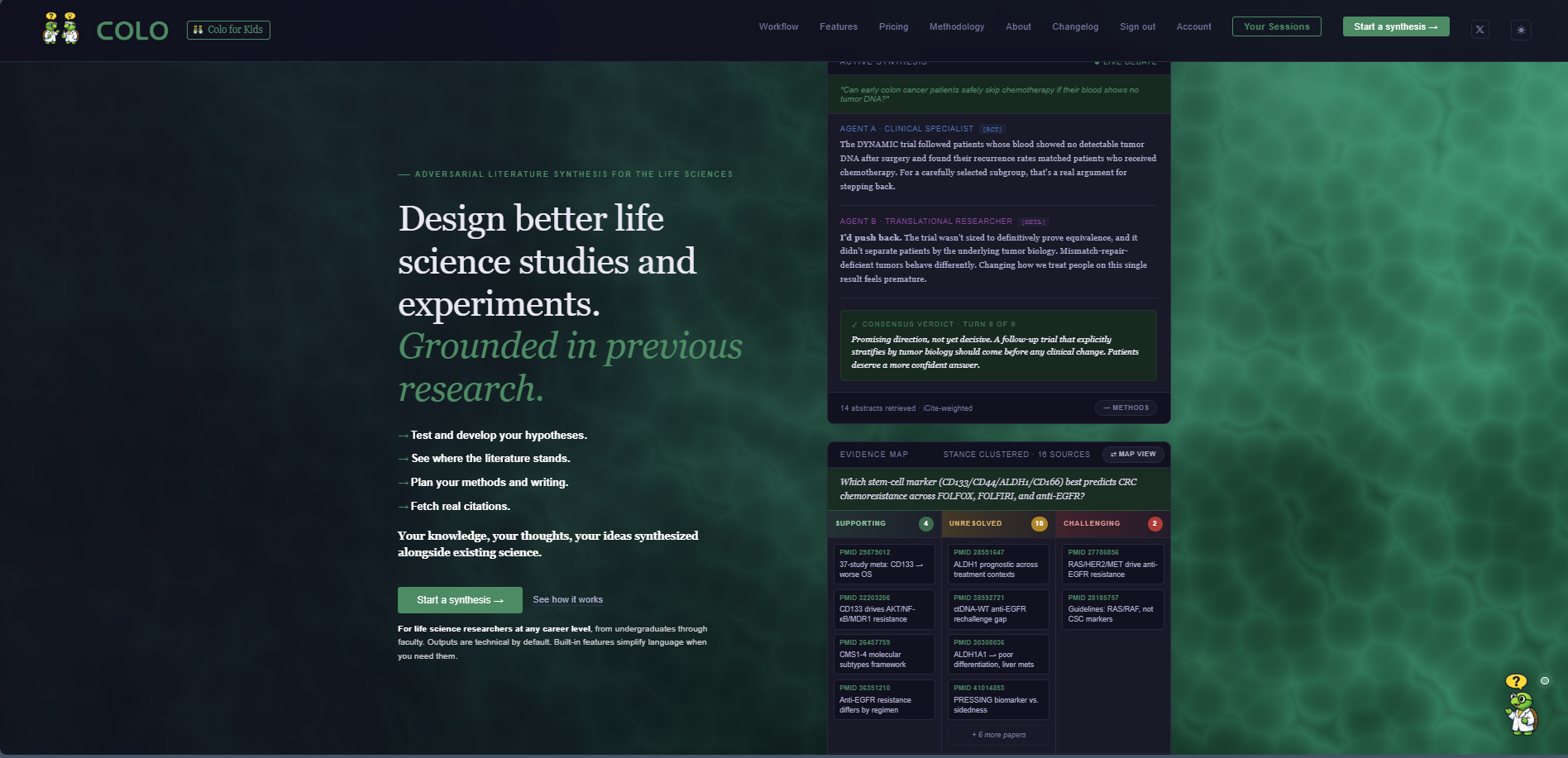
The home page got a substantial visual and copy refresh, the workflow now formally includes the evidence map as its own stage, and a coming-soon teaser is up for a kid-facing companion product.
Evidence map is now a named workflow stage
The workflow diagram on the home page now shows six stages instead of five, with the evidence map sitting between adversarial review and experimental design. This matches how the product actually works: the debate produces a navigable map of every cited paper, then the design step builds on that grounding.
Tighter hero and feature grid
- Hero bullets compressed: the four-bullet pitch under the headline is now one short line each. Easier to scan, lands the value in two seconds instead of fifteen.
- "What makes Colo different" section: the six capability cards (Reasoning, Evidence quality, Retrieval, Transparency, Continuity, Scope) now each carry a small icon and a single bold headline. The evidence-quality card displays the four tier labels as colored pills ([RCT], [META], [COHORT], [PRECLINICAL]) so the hierarchy is visible at a glance.
- Updated scope numbers: 16 specialties, 3.4M indexed abstracts, reflecting the corpus expansion below.
Typography and logo polish
Feature headlines now render in Manrope, a modern sans-serif that reads as designed rather than default. The two-turtles wordmark in the top nav picked up a subtle two-layer drop shadow so it sits slightly above the page rather than floating flat.
Faster evidence maps under load
The semantic plot endpoint now caches results by content fingerprint. If you reload the same evidence map, open a second tab on the same session, or come back after navigating away, the plot now appears almost instantly instead of recomputing. The cache is shared across all users, so common projections also stay warm for everyone.
Colo Learn is live
A kid-facing companion product launched at colo-sci.com/learn. Two friendly turtles named Lewis and Sage take turns answering science questions in plain words, aimed at elementary and middle-school curiosity. Features include voice readout, karaoke text that highlights as the turtles speak, and on-demand pictures for visual learners. Built as a separate app rather than a voice toggle inside the researcher product, since the audience and the UX needs are fundamentally different.
The Tone selector on every workflow page lists a fourth tier, 🧒 Curious, which opens the kids' app in a new tab. There is also a "Try Colo for Kids" button in the top-left of the nav on the home page.
Corpus expansion: 16 specialties, 3.4 million abstracts May 17, 2026
The biggest data update since launch. Colo's indexed PubMed library doubled in coverage and roughly tripled in size, with eight new specialty domains added on top of the original eight.
New specialties
- Psychiatry: depression, anxiety, bipolar disorder, schizophrenia, addiction, ADHD, eating disorders, sleep disorders
- Endocrinology: diabetes, thyroid disorders, obesity, metabolic syndrome, PCOS, osteoporosis
- Gastroenterology: IBD, IBS, GERD, celiac disease, liver disease, microbiome, gut motility
- Pulmonology: COPD, asthma, pulmonary fibrosis, lung function, sleep apnea
- Nephrology: chronic kidney disease, dialysis, kidney transplant, electrolyte balance
- Hematology: anemia, sickle cell, leukemia, lymphoma, coagulation disorders
- Ob/Gyn: pregnancy, fertility, menopause, gynecologic conditions, prenatal care
- Bioinformatics: computational biology, machine learning in life sciences, structural prediction
How specialty selection works now
The setup page shows all 16 specialty pills, each expanding to the subdomains within it (cardiology unfolds into heart failure, atrial fibrillation, stroke, hypertension, and so on). Pick one or several; Colo routes your retrieval to just those specialties. Total searchable corpus is now 3.4 million peer-reviewed PubMed abstracts.
Faster, more reliable retrieval
Under the hood, each specialty now lives in its own dedicated index rather than one giant unified database. Queries against a specific specialty route directly to that index instead of filtering across everything, which makes searches noticeably faster for typical single-specialty work and prevents the timeout errors that occasionally surfaced on metadata-filtered queries.
Evidence map becomes its own workflow step May 14, 2026
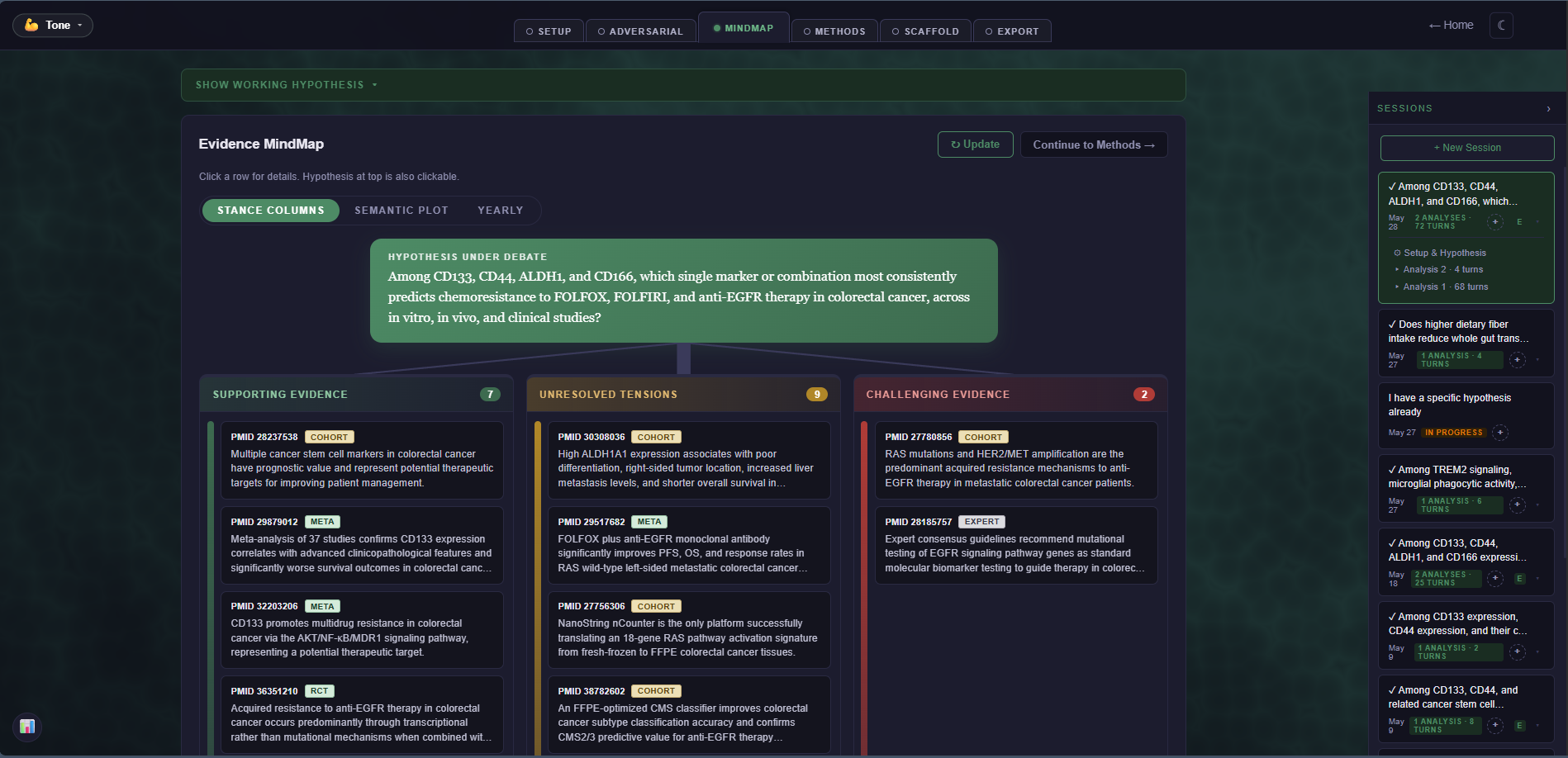
The mindmap is no longer tucked inside the export view. It now has its own dedicated page in the workflow chain, sitting between adversarial review and methods design.
New pipeline order
Setup → Adversarial → Mindmap → Methods → Scaffold → Export. The mindmap page carries the full session context forward and classifies every cited paper into supporting, unresolved, or challenging stances. The same visual you've been using in the export view, now first-class in the flow.
Why the move
The mindmap had always been one of the most-asked-about parts of Colo, but it was hard to find buried under the export step. Lifting it out gives you a deliberate place to pause, look at where the evidence sits, and decide whether the debate covered enough ground before continuing to design.
Free-tier debate length confirmed
Free accounts can now run the full first four turns of an adversarial debate without entering payment information. After the fourth turn, the workflow transitions to a paywall card for methods, scaffold, and additional turns. The mindmap step is visible on the free tier so you can see what the debate produced before deciding whether to continue.
Pick the tone that fits you May 12, 2026
Colo now adapts how its agents talk based on where you are in your research career. Three active tiers, picked once from your account page and toggleable from any workflow screen, change how technical the explanations are without changing the rigor of the science.
The three tiers
- 🌱 Learner: Plain English throughout. Technical terms get defined in parentheses the first time they show up. Effect sizes are translated. Great for graduate students, undergraduates, and anyone returning to a field after a long gap.
- 💪 Trained: The default. Active-researcher voice, no orientation, terms used as-is. Same behavior Colo has had since launch.
 Expert: Reserved for the post-launch update when Expert mode goes live. The tier card is visible, the voice tuning is still being calibrated.
Where to set it
- Account page: four big cards under Preferences let you pick (or change) your tier any time. Your selection persists across devices.
- Inline on every workflow page: a small Tone pill in the top-left of the workflow nav. Click to switch on the fly without leaving the page you're on.
What changes when you switch
- Setup: hypothesis refinement asks easier-to-answer clarifying questions in Learner mode, with concrete examples for the one-variable vs multivariate branch.
- Adversarial debate: the two agents keep their strict CLAIM/EVIDENCE/CHALLENGE structure and citation rules. Only the prose around them softens. PMID grounding never changes.
- Methods and Scaffold: technical terms get inline definitions, statistical concepts get brief explanations, but the panel structures and grant conventions stay intact.
Coming soon
A fourth tier, 🧒 Curious, is visible on the account page marked "Coming soon." That tier will ship as a separate workspace tuned for K-12 and early-stage learners, not as a voice toggle inside the researcher product. Different audience, different surface.
Talk to Colo on the homepage May 11, 2026
The homepage now has a small chat window in the bottom right. Tap the mascot to ask questions about how Colo works, what makes the synthesis trustworthy, or where to start. It is meant for visitors deciding whether to try the workspace, not for running an actual synthesis.
What's new
- Floating Colo agent: always available in the corner of the homepage, scrolls with you. Click the mascot to open the chat panel.
- Bounded scope: the agent only answers questions about Colo itself. For real literature questions, it will point you to the workflow.
- Plain-English homepage copy: hero text reworked to "Design better life science studies and experiments." Four short bullets replace the old jargon-heavy paragraph (no more "Specific Aims," "adversarial debate," or "stance-clustered mindmap" up front).
- Plainer mindmap caption: the semantic plot now reads "Cluster scientific papers based on their proximity to your research question" instead of the more technical "Distance reflects semantic similarity."
- Direct support contact: the agent knows to point you to support@colo-sci.com for bugs, feedback, or anything a human should look at.
Pay-as-you-go launch May 8, 2026
Researchers who don't need a monthly commitment can now buy synthesis credits in one-time packs. Same workflow access as the Researcher subscription, but billed only for what you actually generate.
What's new
- Three credit packs: $5 Starter, $15 Explorer, $30 Burst. Credits never expire.
- Same full feature access as the Researcher plan: evidence-map mindmap, methods design, grant scaffolding, exports, citation provenance.
- Per-call metering: each adversarial turn, methods generation, and mindmap classification deducts in proportion to actual token usage. No fixed per-session caps.
- Top up whenever: packs stack on your existing balance, no rollover or expiration math to track.
What stays subscription-exclusive
- Custom PubMed corpora: building a private corpus reserves ongoing infrastructure (per-corpus indices, build worker time, API rate budget) that pack pricing doesn't cover. Researcher plan still includes up to 5 saved builds.
Updated pricing page
/pricing now shows subscription and pay-as-you-go side by side as two ways to pay for the same product, rather than two separate tiers. The shared feature list at the top covers what both options unlock; the columns below cover the cost model.
Multi-view mindmap and home page refresh May 7, 2026
The mindmap composer in the export view now offers three different ways to look at the same set of cited papers, and the home page hero card lets you flip between a stance-clustered list and a semantic projection.
Three mindmap views
- Stance columns: the original layout. Supporting / Unresolved / Challenging, ranked by similarity to the hypothesis.
- Semantic plot: a true 2D projection of every cited paper. Distance to the hypothesis diamond reflects topical similarity. Algorithm auto-picks based on library size: UMAP for 30+ papers, MDS for smaller libraries.
- Yearly: papers laid out along their publication year, with stance bands so you can see when the field's understanding shifted.
Re-classify on demand
A new ↻ Update button on the mindmap composer re-runs the classifier across the full session. If your debate kept going past the point where the mindmap was first generated, one click brings the visualization back in sync.
Home page evidence map flip card
The hero card on colo-sci.com now flips between the stance-column view and a semantic scatter of the same 16 papers. Click any dot for the paper's stance, year, summary, and a direct link to PubMed.
Token usage transparency on the adversarial page May 6, 2026
A new 📊 button at the bottom of the adversarial chat opens a popover showing exactly how many calls and tokens your current session has consumed, broken out by stage (setup, intake, adversarial debate, mindmap classifier).
Useful for researchers who need to estimate cost on their own side, and for anyone curious where their session's token budget is actually going.
What's actively being worked on
The roadmap below isn't a guarantee, but it is what the immediate product investment is going toward. If any of these are blocking a workflow you care about, the support page reaches a real human.
Live credit balance display
A small Credits remaining indicator next to the existing token tracker on workflow pages, so pack users can see their balance burn in real time. Soft warning banners at 80% and 95% used.
Inline top-up modal
When a session runs out of credits mid-flow, a top-up modal pre-loaded with the three pack options will appear in place of a generic "out of credits" error.
RAG-grounded methods and scaffold
Currently the methods and scaffold pages reason from the hypothesis and adversarial transcript. A "Grab more papers" button will let you pull additional PubMed evidence into the conversation context for both pages, with the agents citing retrieved PMIDs inline as they design study methods or build grant Specific Aims.
Faster repeat loads on the evidence map
Coming soon: when you revisit a session's evidence map after the first view, it will appear almost instantly instead of recomputing. The cache will refresh automatically as new papers come in.
Multi-study-type workflow design
Today the methods page locks you into one study type per session (RCT, in vitro, cohort, etc). Many real research programs are hybrid: a translational arc that pairs in vitro mechanism work with a cohort validation, or an RCT with a parallel preclinical sub-study. We're scoping a workflow that lets a single session design across multiple study types in one structured plan, with shared endpoints and aligned timelines. This is a larger build and won't ship soon, but it's on the roadmap.